SSC OTR 2026 – One-Time Registration Steps and Edit Rules
Every SSC exam application starts with a One-Time Registration (OTR) on ssc.gov.in. An OTR made on the old ssc.nic.in site does not work on the new one. You fill personal details, verify your mobile and email by OTP, set a password, add your address and category, and finish within 14 days. Aadhaar authentication is voluntary, but it protects your form from photo and signature rejections and makes exam-day checks lighter.
In this post
Key dates & links
- SSC instructions for filling OTR issued
- SSC notice on Aadhaar-based authentication
- SSC Aadhaar Policy for candidates published
- OTR becomes Aadhaar-enabled
- OTR edit window (first) opened
- OTR edit window (second) opened
- OTR edit facility reopened
Original notification
What OTR is and who needs it
One-Time Registration (OTR) is your permanent profile with the Staff Selection Commission. SSC’s exam notices make it compulsory. Without it, you cannot apply for CGL, CHSL, GD Constable or any other SSC exam.
You register once on ssc.gov.in. After that, every exam form pulls your basic details from the OTR. An OTR made on the old ssc.nic.in site does not work on the new portal. If you last applied years ago, register again.
The OTR stores your basic data. Each exam still needs its own application form, with a live photo and a signature.
Keep these ready
Annexure-III of the CHSL 2026 notice lists what you need before you start:
- A working mobile number and email ID. SSC verifies both by OTP.
- Your Aadhaar number. No Aadhaar? Give another ID number instead: Voter ID, PAN, passport, driving licence, school or college ID, or employer ID. SSC will ask for the original document later.
- Your Class 10 board, roll number and year of passing.
- Your disability certificate number, if you have a benchmark disability.
Skipping Aadhaar authentication means you upload proofs instead. You need proof of name, date of birth, address and gender, plus a photograph. SSC’s Aadhaar Policy also lists father’s name. CHSL’s proof lists include Aadhaar, Voter ID, PAN, a driving licence, a birth certificate and a school leaving certificate.
How to register, step by step
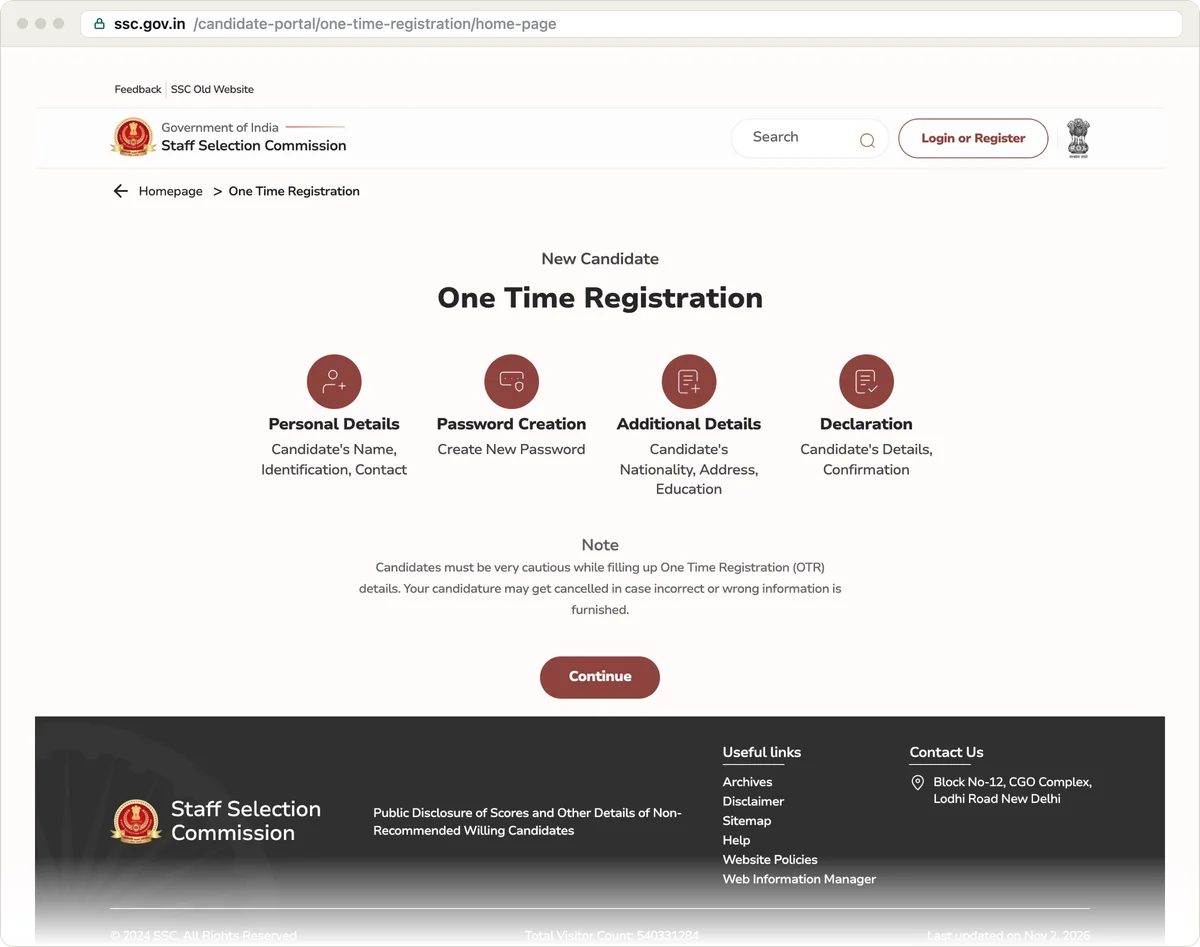
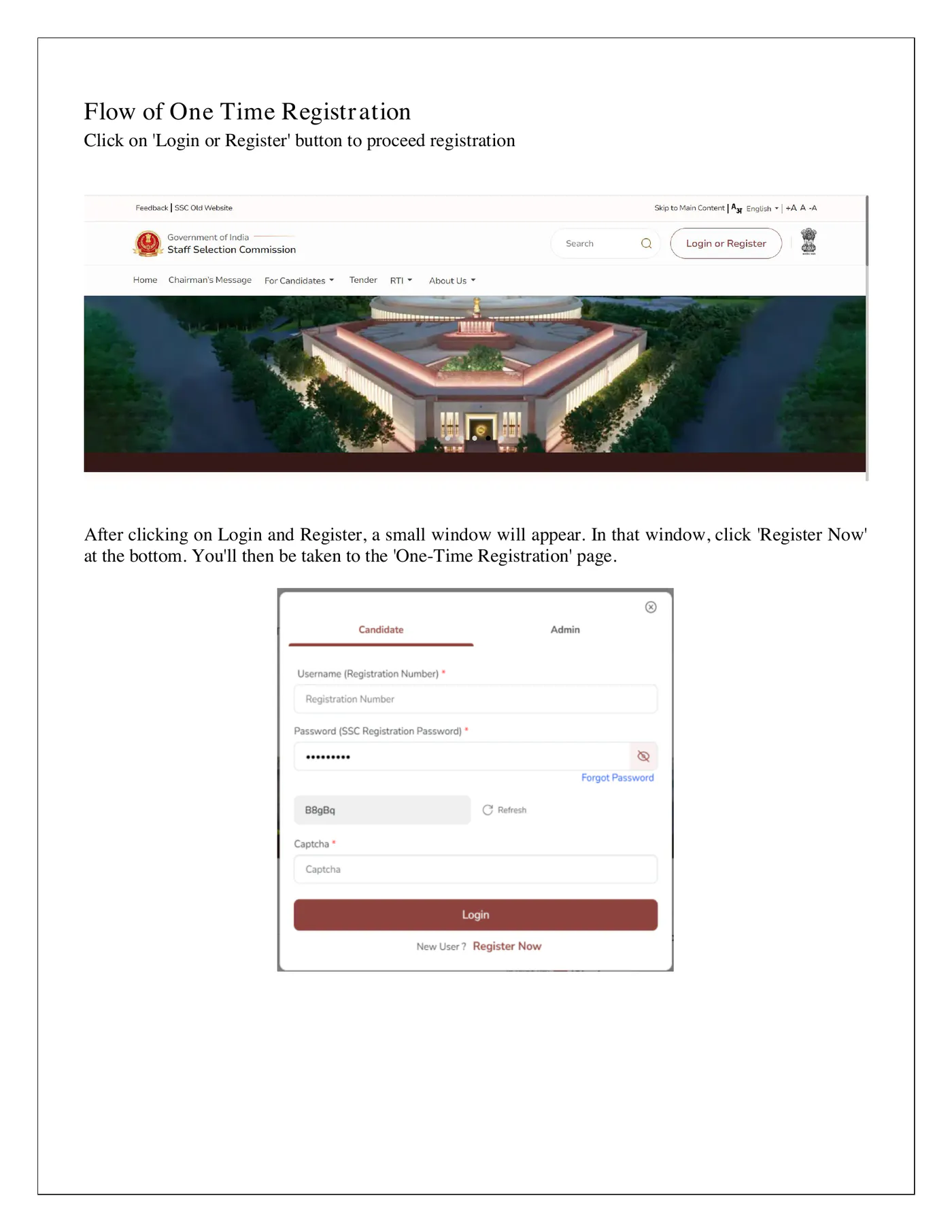
- Open ssc.gov.in and click “Login or Register”. In the small window, click “Register Now”.
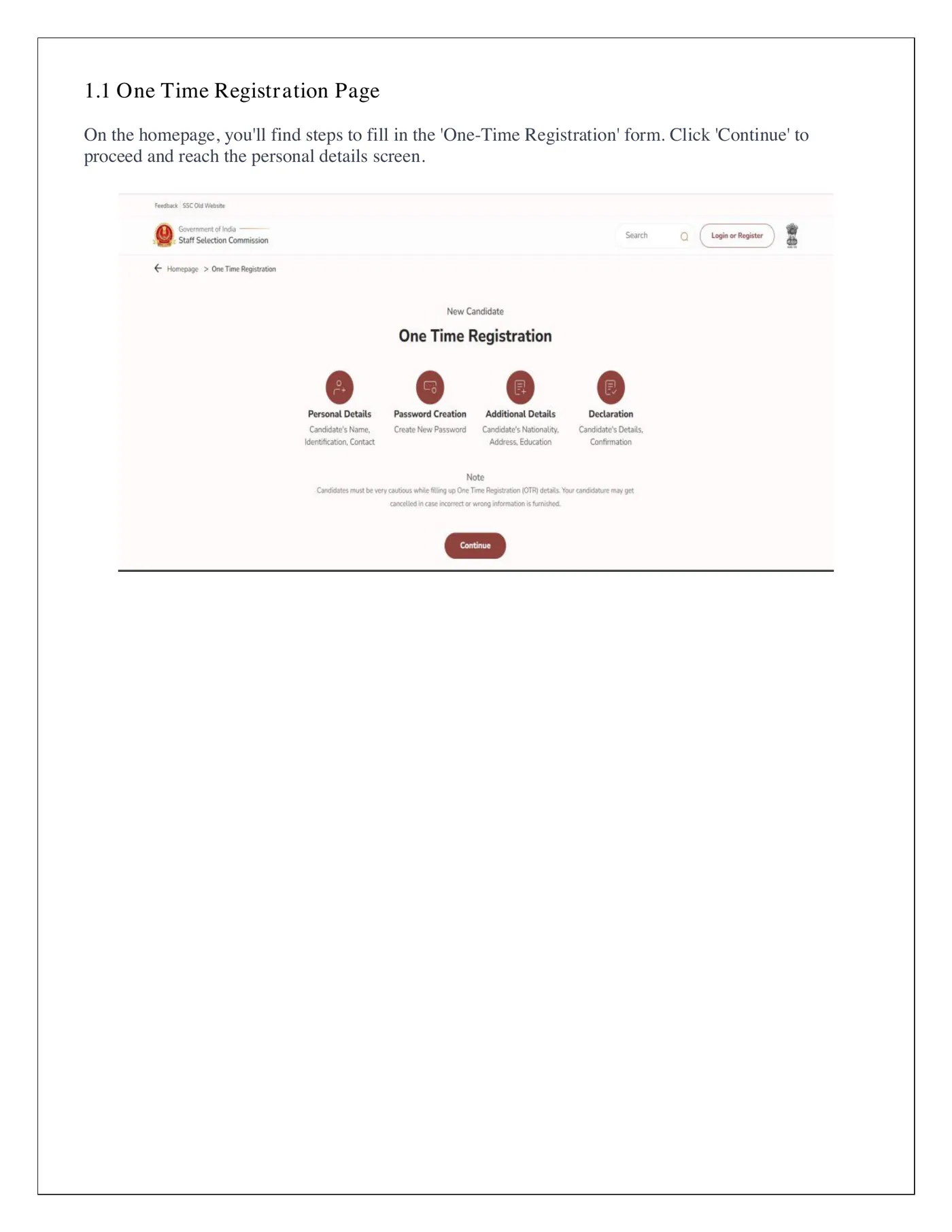
- On the One Time Registration page, click “Continue”.
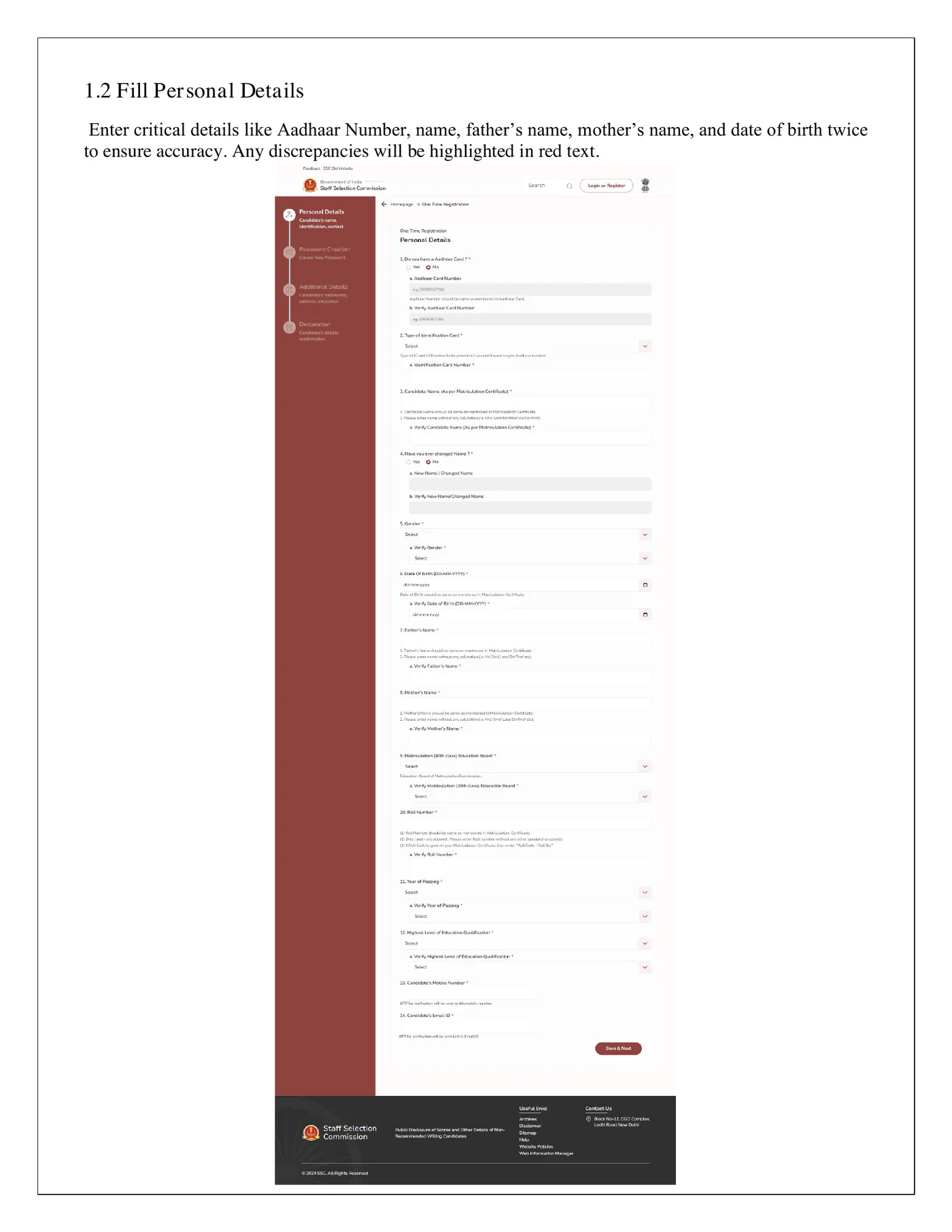
- Fill the personal details. Type your name, father’s name, mother’s name and date of birth exactly as your Class 10 certificate shows them. If your name changed after Class 10, record it at Sl. No. 3a and 3b.
- Enter key fields such as Aadhaar number, name and date of birth twice. A mismatch shows up in red.
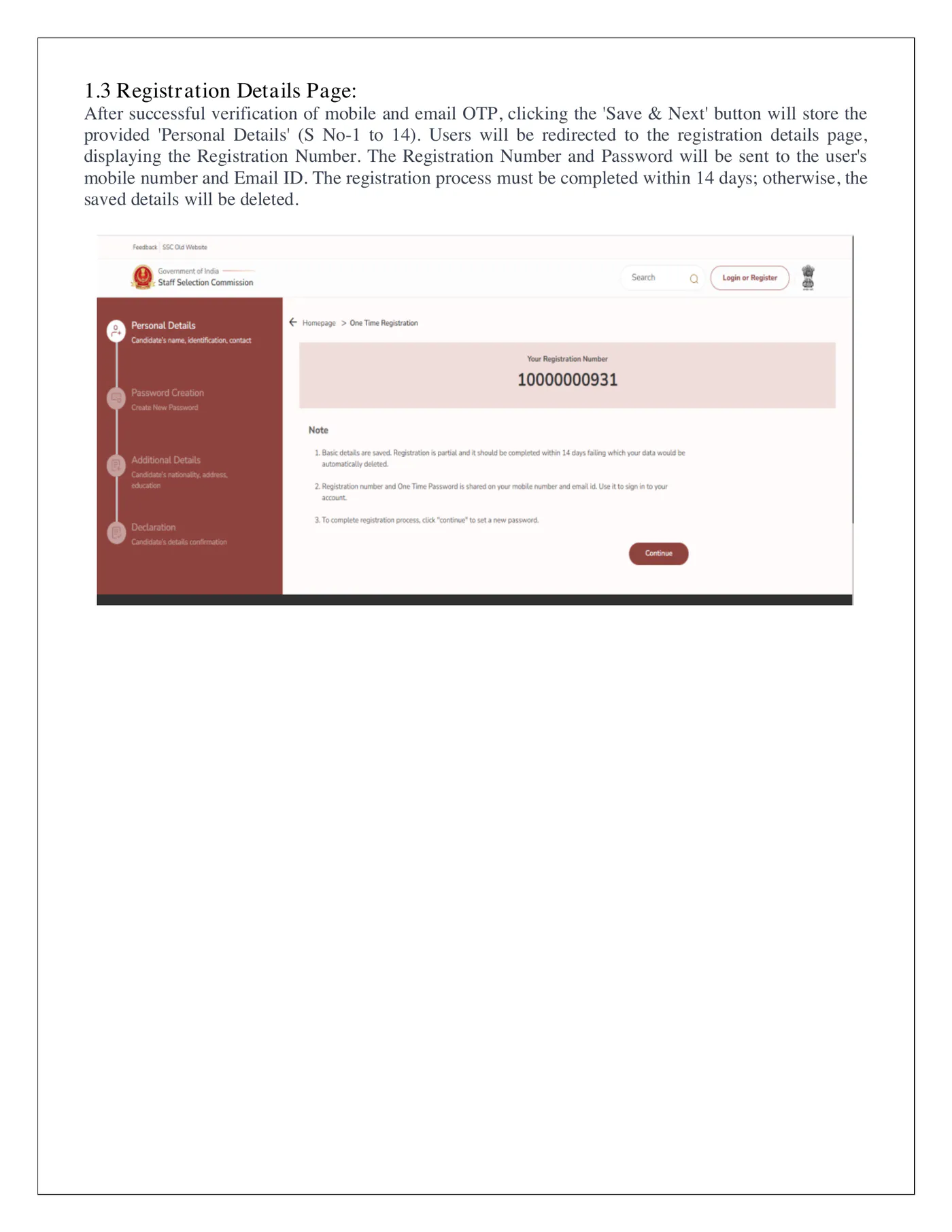
- Verify your mobile and email with the OTPs and click “Save & Next”. The screen shows your Registration Number. SSC also sends it, with a password, to your phone and email.
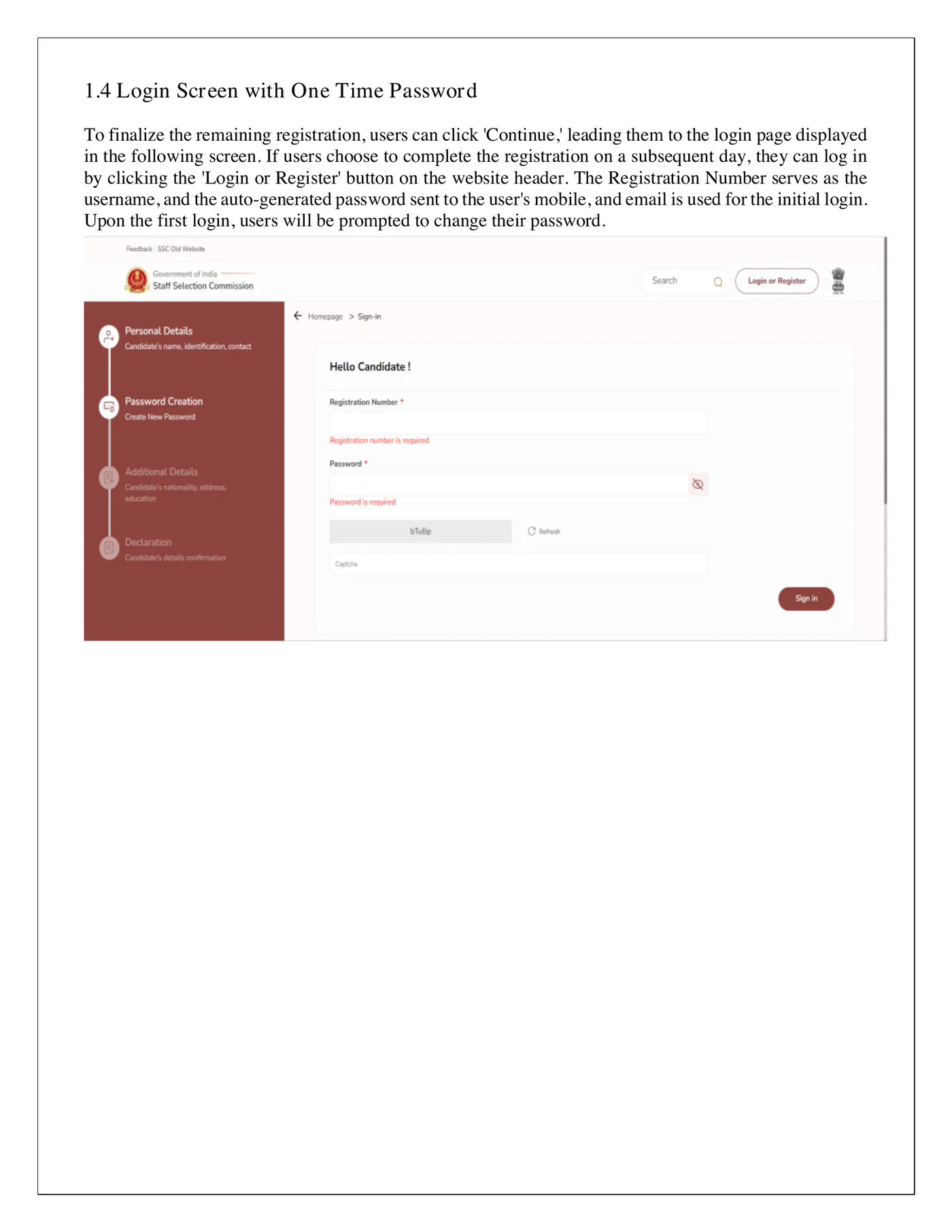
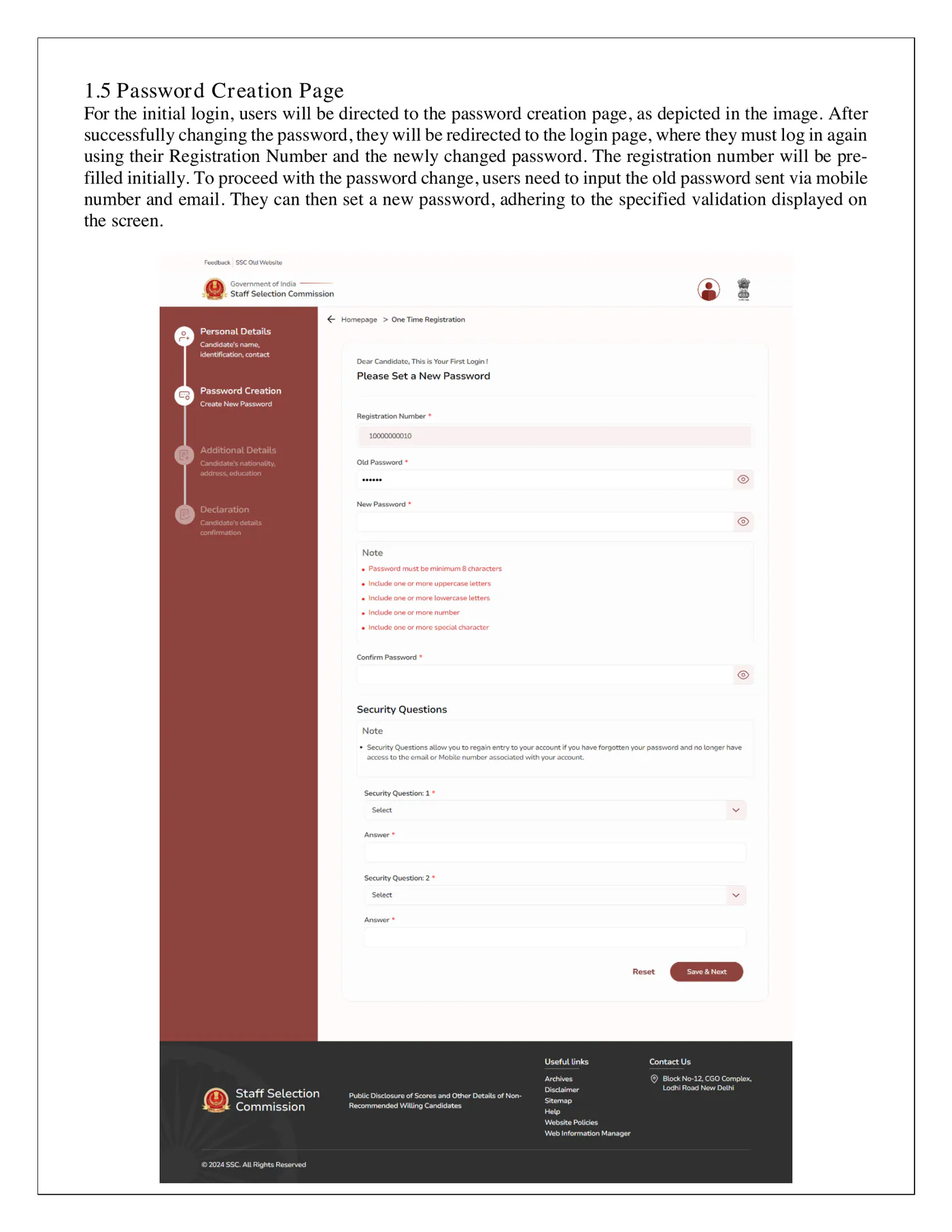
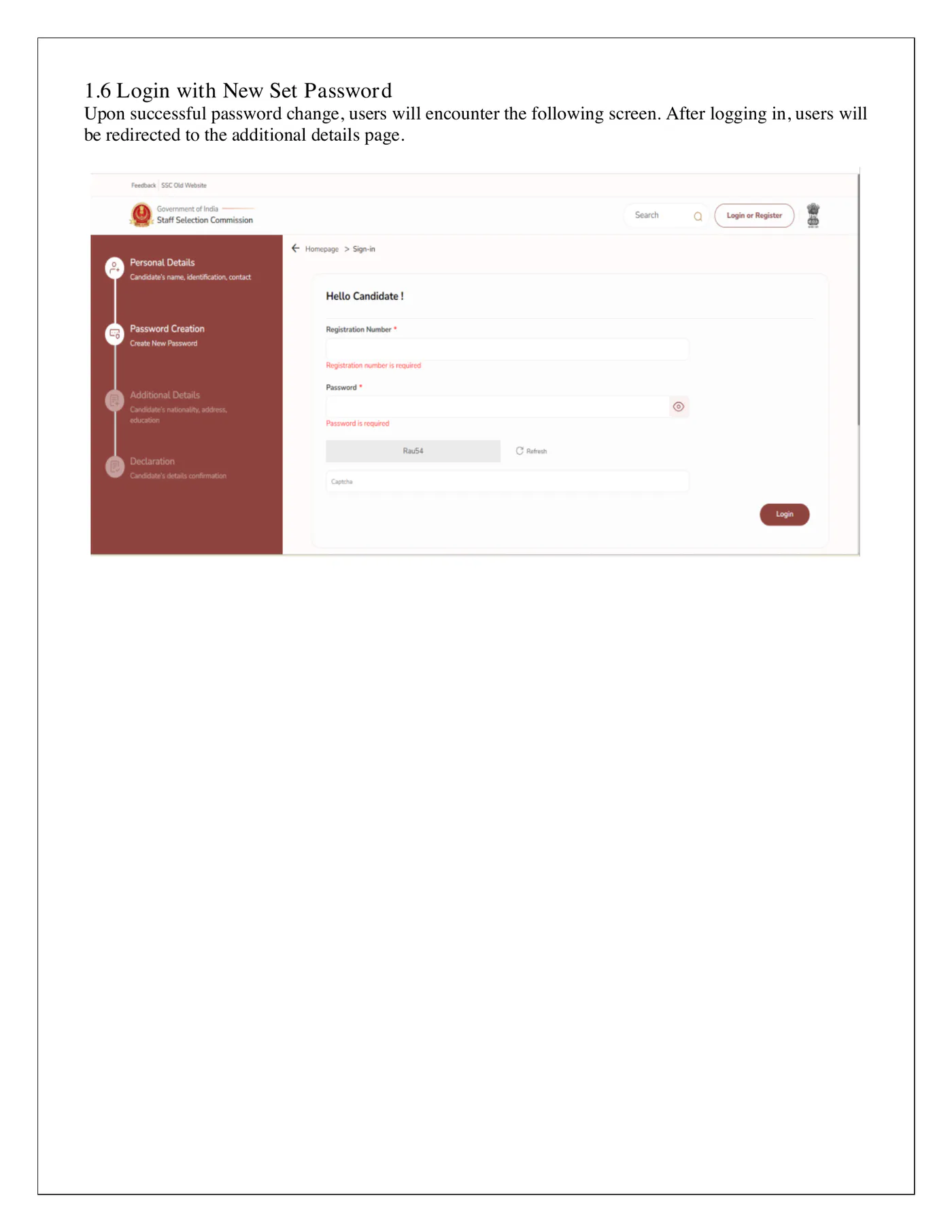
- Log in with the Registration Number and that auto-generated password. SSC asks you to set a new password. Then log in again with it.
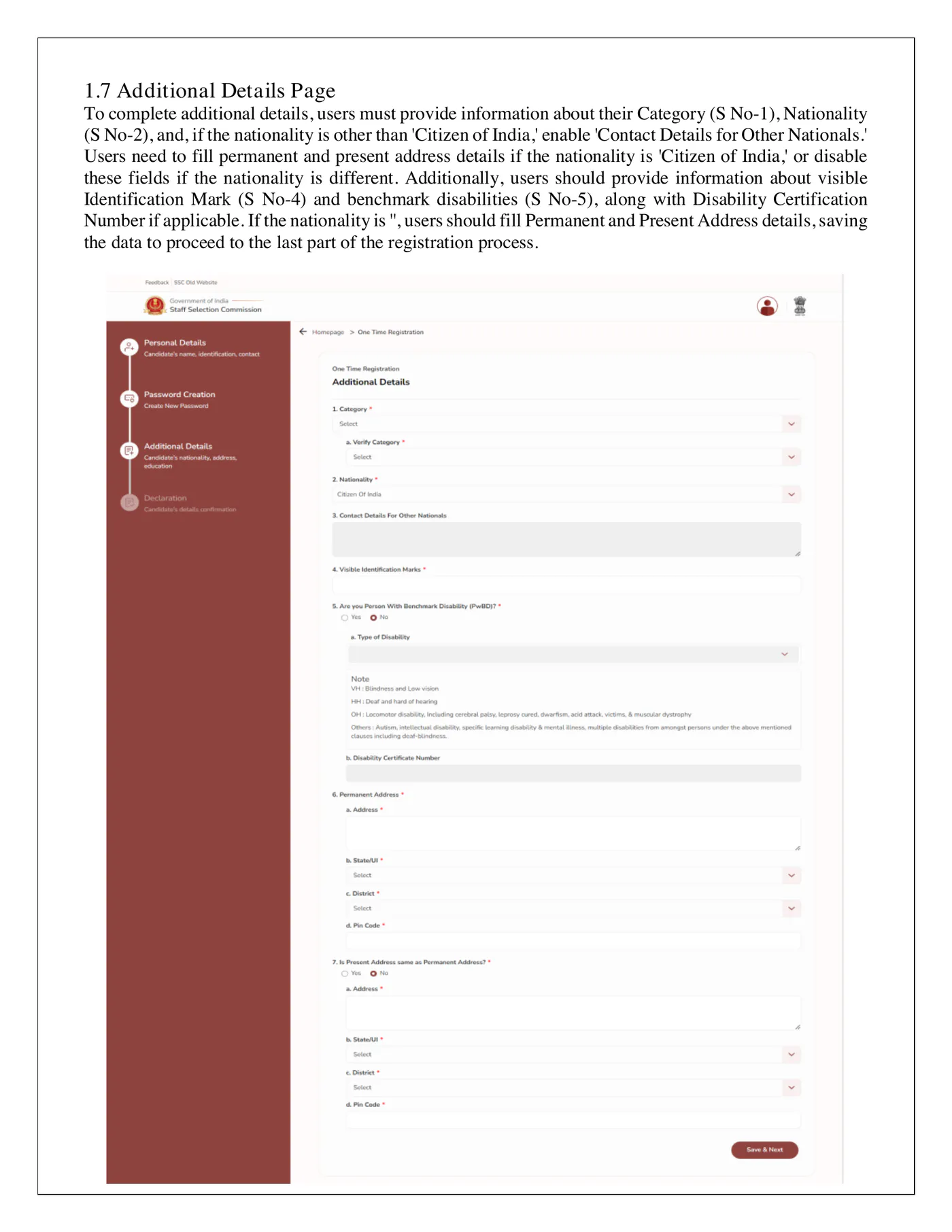
- Fill the additional details: category, nationality, a visible identification mark, any disability, and your permanent and present address.
- Check the draft preview, then click “Final Submit”. SSC sends two OTPs. Enter either one.
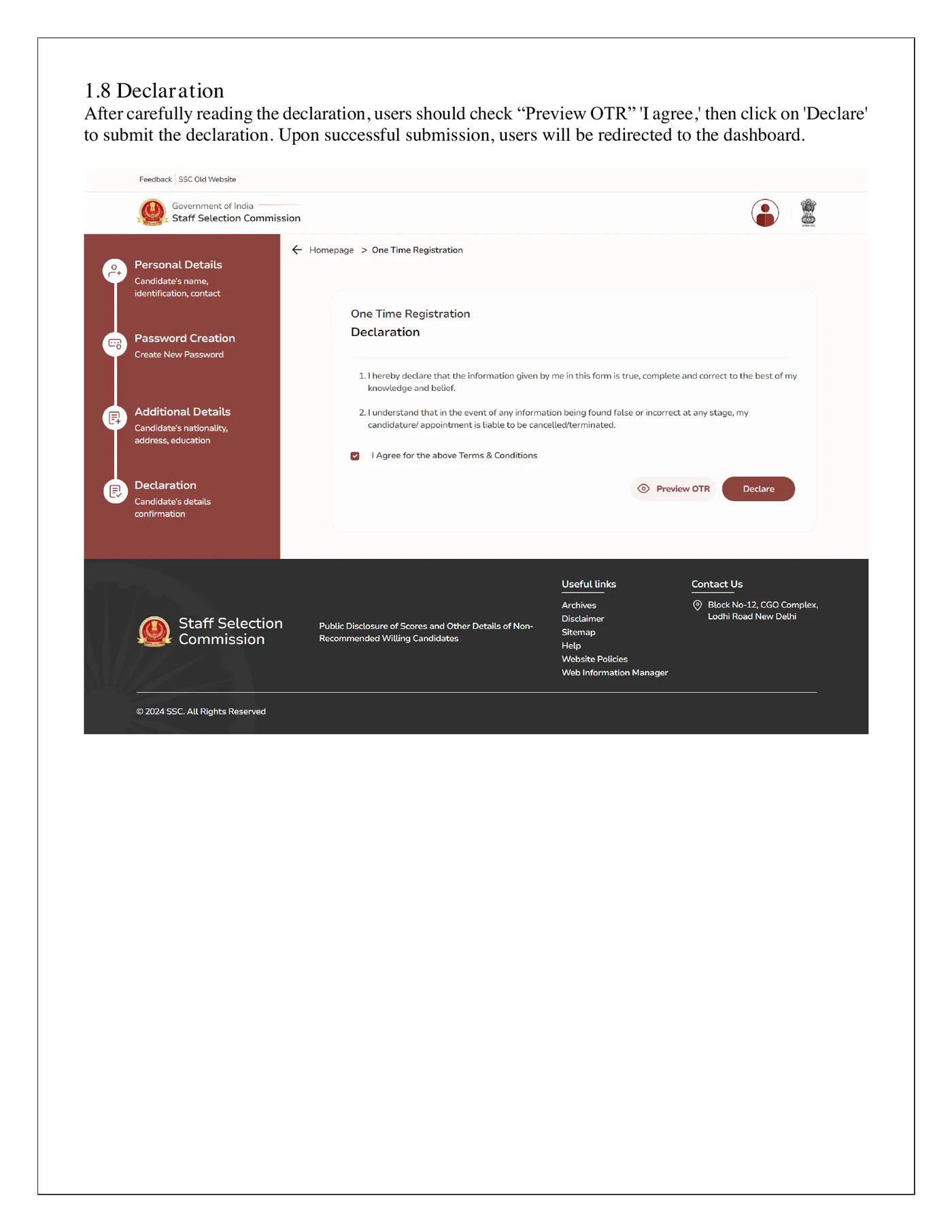
- Read the declaration and click “I Agree”.
Finish within 14 days of saving the basic details. Otherwise SSC deletes your data and you start over.
Aadhaar authentication and what it changes
SSC’s notice of 16 April 2025 made Aadhaar authentication available from May 2025, and kept it voluntary. Since 2 June 2025, the OTR itself has been Aadhaar-enabled.
Under SSC’s Aadhaar Policy, you authenticate by Aadhaar OTP at OTR. Face authentication follows when you submit an application, and fingerprint or iris checks at the exam. The policy also offers Aadhaar checks at PET/PST, medical tests, document verification and joining.
Your OTR entries stay final. SSC’s notice of 4 June 2025 says Aadhaar details will not override what you typed in the OTR. So a spelling difference between Aadhaar and your Class 10 certificate does not rewrite your form.
The CHSL 2026 notice shows what changes on exam day:
| Aadhaar-authenticated | Not authenticated | |
|---|---|---|
| Photo or signature below standard | Application not rejected on that ground | Liable to rejection |
| Entry to the venue | Closer to gate closing time (SSC Aadhaar Policy) | Report two hours before the exam starts (para 14.7) |
| Photos and photo ID at the venue | Not required (para 9.3) | Admit card, two passport-size colour photos and an original photo ID |
SSC’s Aadhaar Policy words the early-reporting rule differently: at least two hours before gate closing time. We still suggest an original photo ID with your admit card. Para 14.10 also asks you to carry any document your admit card lists.
Live photo capture
SSC takes the live photo in each exam application form. The form uses your camera, so you never upload an old picture. If you capture a picture of an existing photo, SSC rejects the application. Aadhaar-authenticated applications are not rejected on this ground.
When the camera opens:
- Sit in good light against a plain background.
- Keep the camera at eye level and look straight at it.
- Keep your whole face inside the box on screen, neither too close nor too far.
- Remove any cap, mask or spectacles.
If your computer has no camera, scan the QR code under “Upload Documents”. It downloads an Android app that takes the photo on your phone.
You can also apply fully in the mySSC app on Android 11 or higher. For that, you must first register on the OTR page with your Aadhaar number. SSC also asks you to install the Aadhaar Face RD app.
Your look on exam day should match this photo. Venue staff can turn away any candidate who seems suspicious.
Signature specs
Upload a scanned signature in JPEG/JPG format between 10 and 20 KB. Para 9.6 of the CHSL notice gives the size as about 6.0 cm wide and 2.0 cm high. Annexure-IV of the same notice says 4.0 cm by 2.0 cm.
The SI 2026 notice gives 6.0 by 2.0 twice and 4.0 by 2.0 once. So 6.0 by 2.0 is the safer size.
A blurred or tiny signature gets the form rejected unless you chose Aadhaar authentication.
Editing your OTR, and the limits
SSC first said OTR edits would close on 31 May 2025. It then opened a window from 19 to 30 June 2025, after complaints about OBC/EWS status and qualifications. A second window ran from 14 to 31 August 2025. On 8 October 2025, SSC reopened the edit facility with no closing date announced.
Current notices disagree. CHSL 2026 points you to a “Modify Registration” tab on the dashboard. The SI in Delhi Police and CAPF 2026 notice says you cannot edit OTR data. Check your dashboard before you plan a change.
Edit only for a genuine reason. SSC’s notice of 17 June 2025 treats edits without proper justification as suspicious activity. SSC sees them as an attempt to mislead it and holds them against you. The CHSL notice also says SSC will not accept a later request to change your mobile number or email.
Forgot your registration number or password
The ssc.gov.in login window has a “Forgot Password” link. SSC uses your registered mobile number and email ID to retrieve a lost password or Registration Number. Keep both active.
If an SSC email never came, check your spam folder. Still stuck? Contact your Regional Office helpline. The SSC helpdesk is 1800-309-3063, or helpdesk-ssc@ssc.nic.in. SSC ignores representations sent on paper.
Never create a second OTR to get around a lost login. If SSC finds applications from one candidate under different registration numbers, it rejects all of them. It also cancels your candidature. Appearing in the exam more than once can lead to a ban from SSC exams.
Common errors and fixes
Face authentication confuses many applicants. One CGL candidate asked:
"I had applied for SSC CGL form...but did not do face authentication, still my form is showing successful and the printout has also been downloaded...will the form be rejected without face authentication?" (Careers360, July 2026)
SSC’s Aadhaar Policy calls Aadhaar authentication optional at every stage. Skipping it puts you on the document route. Your photo and signature must then meet the rules, and you report early on exam day.
Others make a typing mistake:
"i have done mistake in my birthday date in the ssc registration form. can i able to change my birthday date in the form." (Careers360, July 2025)
Fix it through the OTR edit facility while SSC offers one. Your date of birth must match your Class 10 certificate. A date of birth that differs from your admit card or ID can keep you out of the exam. SSC can also cancel your candidature at document verification.
Other common problems:
- Biometric authentication fails. SSC’s notice of 1 July 2025 says to update your Aadhaar biometrics at the nearest Aadhaar centre.
- Visually impaired candidates struggle with face scans. Since 8 October 2025, they can skip face authentication at the application stage. The CHSL 2026 notice lets them use Aadhaar OTP instead. They still face biometric checks at the exam.
- Some sites still quote a photo file size of 20 to 50 KB. Current SSC notices set no photo file size, because the form captures the photo live.
With your OTR done, you can follow results such as the GD Constable PET/PST shortlist. Our step-by-step guides cover other forms too.
Frequently asked questions
Is One-Time Registration compulsory for SSC exams?
Yes. SSC exam notices require an OTR on ssc.gov.in before you can fill any application. Once it is complete, you can apply for any SSC examination from the same login.
Will my old SSC registration from ssc.nic.in still work?
No. SSC notices say an OTR made on the old ssc.nic.in website does not work on ssc.gov.in. Register again on the new site. That OTR then stays valid for every exam you apply for there.
Is Aadhaar compulsory for SSC OTR?
No. SSC calls Aadhaar authentication voluntary. Without it, you upload proof of your name, date of birth, address and gender, plus a photograph, to complete the OTR. SSC's Aadhaar Policy also lists father's name.
What is the signature size for SSC applications?
The CHSL 2026 notice asks for a scanned signature in JPEG/JPG format of 10 to 20 KB. Para 9.6 gives about 6.0 cm wide and 2.0 cm high, but Annexure-IV says 4.0 cm by 2.0 cm. The photograph is not uploaded from a file. The form captures it live.
Can I edit my SSC OTR after submitting it?
Only when SSC allows it. It opened edit windows in June and August 2025 and reopened the facility on 8 October 2025. The CHSL 2026 notice points to a 'Modify Registration' tab on the dashboard, but the SI 2026 notice says OTR data cannot be edited.
I forgot my SSC registration number or password. What now?
Use 'Forgot Password' on the ssc.gov.in login window. SSC uses your registered mobile number and email ID to send back the password or registration number. If the email never arrived, check your spam folder first.
Official sources
- SSC: Instructions for filling One Time Registration (OTR), 22 February 2024 (PDF)
- SSC notice: Aadhaar Based Biometric Authentication in SSC examinations, 16 April 2025 (PDF)
- SSC notice: Aadhaar-enabled OTR from 2 June 2025, dated 9 May 2025 (PDF)
- SSC: Aadhaar Policy for candidates, 23 May 2025 (PDF)
- SSC notice: application through mySSC mobile app, 2 June 2025 (PDF)
- SSC notice: Aadhaar details will not override OTR data, 4 June 2025 (PDF)
- SSC notice: OTR correction from 19 to 30 June 2025, dated 17 June 2025 (PDF)
- SSC notice: issues regarding biometric registration, 1 July 2025 (PDF)
- SSC notice: OTR edit facility 14 to 31 August 2025, dated 13 August 2025 (PDF)
- SSC notice: OTR edit facility from 8 October 2025 and VH face-authentication bypass (PDF)
- SSC Notice of Combined Higher Secondary (10+2) Level Examination, 2026 (PDF)
- Staff Selection Commission official website
Every fact on this page was checked against the official notification. Always confirm on the official site before paying any fee.